
Signs You Need an API Integration Strategy (and How to Start One)
Disconnected systems and manual data handoffs add friction, errors, and hidden cost. An API integration strategy reduces repetitive work, keeps data consistent across teams, and lowers compliance and operational risk. We usually see companies begin integration work only after a costly mistake or a hiring spike forces one.
If you suspect manual processes are slowing decision-making or exposing you to errors, an API integration strategy frames the work so you get measurable wins without rebuilding everything at once. Below is a practical checklist to help you decide, quick wins you can implement now, a simple cost breakdown, and a phased roadmap to move from band-aid automations to a maintainable integration layer.
Why an API integration strategy matters for business
An integration strategy is more than writing a few API scripts. It's a prioritized plan that aligns integrations with business outcomes—reduced headcount hours, faster reporting, fewer compliance incidents, and more reliable customer experiences. Without strategy you often pay short-term with brittle automations and long-term with mounting technical debt.
We recommend treating integrations as product work: prioritize by impact, pilot early, and add governance so integrations scale safely.
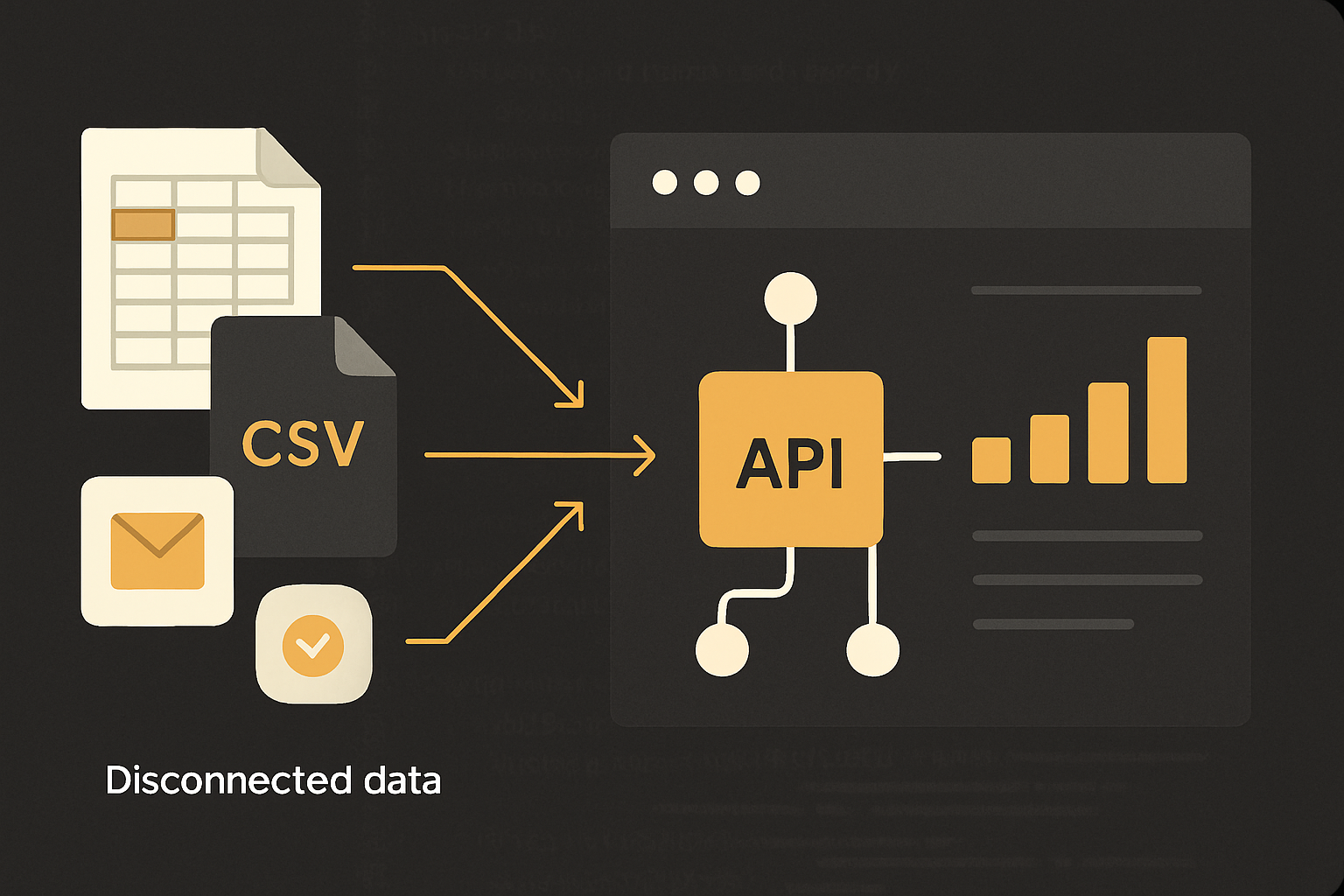
Checklist: measurable signs you need an API integration strategy
Use this checklist to evaluate whether your current mix of manual handoffs, CSVs, and ad-hoc automations is becoming a liability. For each sign we include a practical next step.
1) Teams reconcile data for hours every week
If finance, sales, or ops regularly spend 4+ hours weekly reconciling records, that's lost labor and delayed decisions. Next step: schedule a nightly ETL sync to a reporting store and track reconciliation time before further investment.
2) Multiple "sources of truth" exist across departments
When different teams maintain their own records (CRM vs spreadsheet vs ERP), customer-facing problems happen. Next step: implement a read/write owner model and add API-based syncs for authoritative fields.
3) Repetitive manual handoffs (CSV export/imports)
If people export and import files multiple times per week, it's a clear automation candidate. Next step: replace the highest-volume CSV flow with an API sync or webhook.
4) Key reports take days to compile
Slow reporting delays strategy. Next step: build an incremental ETL or allow direct queries into a consolidated reporting database.
5) Compliance or audit gaps from ad-hoc data stores
Uncontrolled spreadsheets or file shares often lack audit trails. Next step: restrict access, enable logging, and plan for a migration of regulated fields to a controlled system.
6) Onboarding is brittle because workflows are undocumented
If new hires learn a dozen manual steps, productization will help. Next step: document one workflow and automate the most error-prone steps with no-code tools or scripts.
7) Integrations are blocking growth or product features
If new product features require multiple contractors or manual steps, integrations are becoming part of your product. Next step: prioritize two-way integrations and consider a centralized integration layer.
8) Frequent outages or data inconsistencies after vendor updates
If a vendor's API version or behavior breaks your flows, you need governance. Next step: add monitoring, retries, and versioned client code; plan for a stable middleware approach.
If multiple signs match your operations, you're a candidate for a prioritized integration program rather than ad-hoc patches.
Quick wins: three low-risk automation approaches
These options reduce pain quickly while you plan a longer-term strategy.
Scheduled ETL to a reporting store
What it is: nightly or hourly jobs that validate and load data into a single reporting database. Why it helps: it reduces reconciliation and gives reliable queries for KPIs. Practical note: implement simple validation and alerting to catch schema changes.
When to use: reporting pain is the main problem and near-real-time sync is not required.
No-code automation (Zapier, Make) for limited workflows
What it is: connect apps for simple triggers—new order creates an invoice draft, a completed form creates a support ticket. Why it helps: fast, inexpensive prototypes. Practical note: tag automations and track run counts; no-code costs scale quickly with volume.
When to use: workflows are small, predictable, and low-volume.
API-based incremental syncs and webhooks
What it is: lightweight services that listen for changes (webhooks) and apply deltas to another system. Why it helps: near-real-time consistency and lower manual overhead. Practical note: design idempotent updates and a reconciliation endpoint for missed events.
When to use: systems offer APIs and you need near-real-time sync for core workflows.
Build a centralized integration layer vs keep automations
Automations are cheap and fast; a platform is more durable. Choose a centralized integration layer when business goals or technical constraints require it.
- Build an integration layer when:
- Integrations are product-facing or required for revenue.
- You need two-way sync across many systems (CRM, billing, ERP, fulfillment).
- You require strict SLAs, observability, and error-handling across flows.
- Compliance demands audit trails, retention, and encryption.
- You have frequent schema changes and need versioned adapters.
- Continue with automations when:
- Needs are limited to a handful of low-volume workflows.
- Time-to-value must be weeks, not months.
- You can tolerate vendor lock-in from no-code tools in the short term.
We usually recommend starting with automations for immediate relief, then moving high-value, high-risk integrations into a centralized layer.
Cost bands
| Project band | Rough cost range | Typical timeline & scope |
|---|---|---|
| Small automation package | $3k–$15k | 2–6 weeks: ETL scripts, a few Zapier/Make automations, basic monitoring |
| Phased integration MVP | $25k–$75k | 8–16 weeks: core integration layer, 2–4 API adapters, auth, basic dashboards |
| Full integration platform | $100k+ | 4–9 months: scalable middleware, retry/queueing, audit logs, multi-tenant adapters |
Choose a band based on how persistent the pain is and how quickly you need reliable results. Small automations buy time; a phased MVP balances cost and long-term maintainability.
Phased migration roadmap (discover → pilot → central sync → governance)
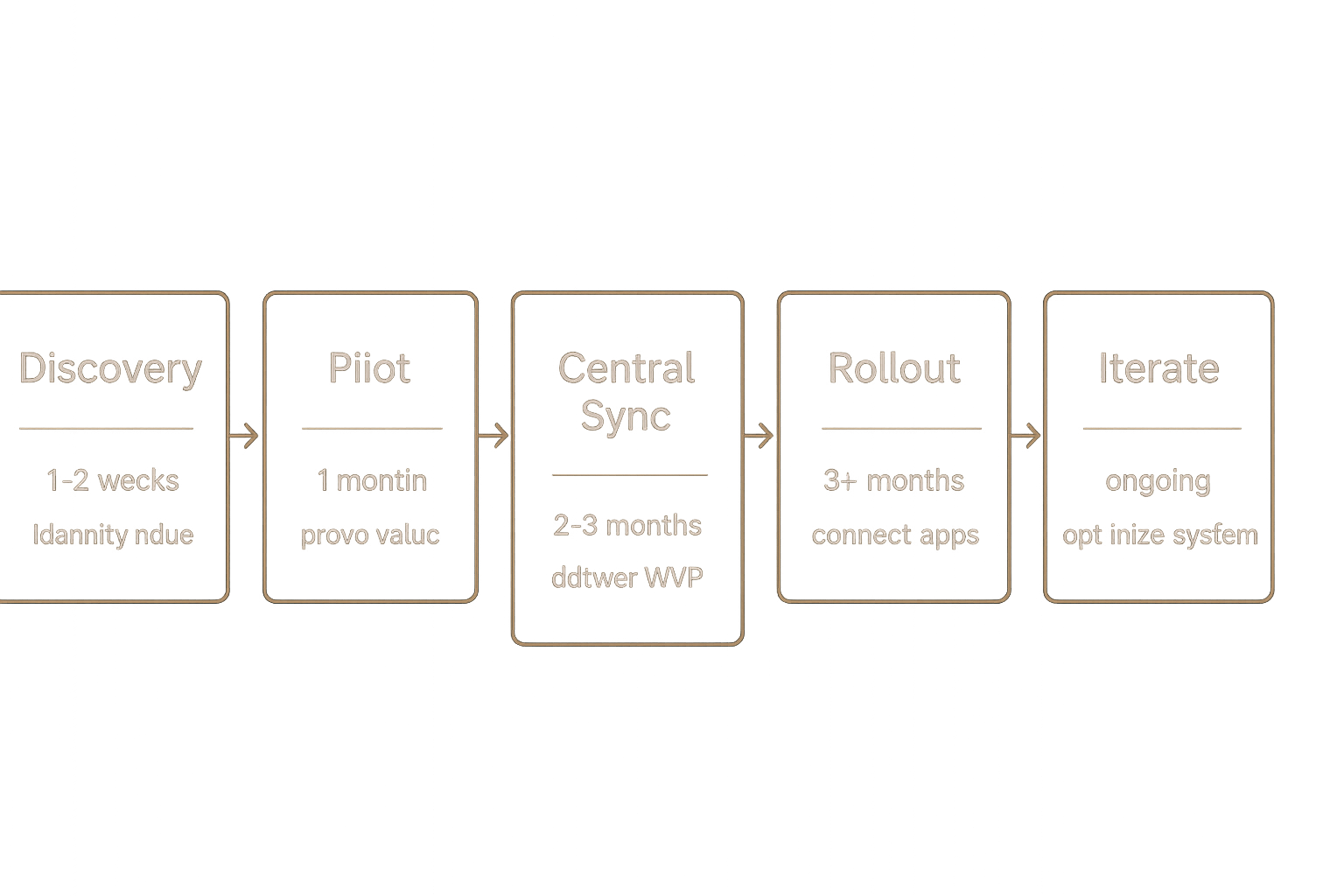
A staged approach reduces risk and delivers measurable improvements at each step.
Discovery (1–2 weeks)
Inventory systems, owners, data volumes, and failure modes. Quantify hours spent on manual tasks and identify the top 3 workflows by impact. Deliverable: prioritized backlog and a simple data flow diagram.
Common pitfall: skipping owners. Avoidance: include domain owners in interviews and require sign-off on priorities.
Pilot (2–6 weeks)
Implement one workflow end-to-end (automation or small service). Validate data integrity, measure time saved, and gather user feedback. Deliverable: working pilot and success metrics.
Common pitfall: pilot scope creep. Avoidance: pick a narrowly scoped, high-impact use case.
Central sync / platform MVP (6–12 weeks)
Convert the highest-value integrations into a centralized service: authentication, adapters, queues, and retry logic. Deliverable: integration MVP with monitoring and an operations runbook.
Common pitfall: underestimating edge cases. Avoidance: include reconciliation scripts and a manual override for failures.
Rollout and training (1–3 weeks)
Train users, update SOPs, and run staged cutovers. Keep previous systems read-only for a verification window. Deliverable: adoption metrics and archived legacy artifacts.
Iterate and govern (ongoing)
Add adapters, automate onboarding for new systems, and implement governance: change control, API versioning, and SLAs. Deliverable: a living integration roadmap and operational dashboards.
Short technical note: security, auth, rate limits, retries, and data mapping
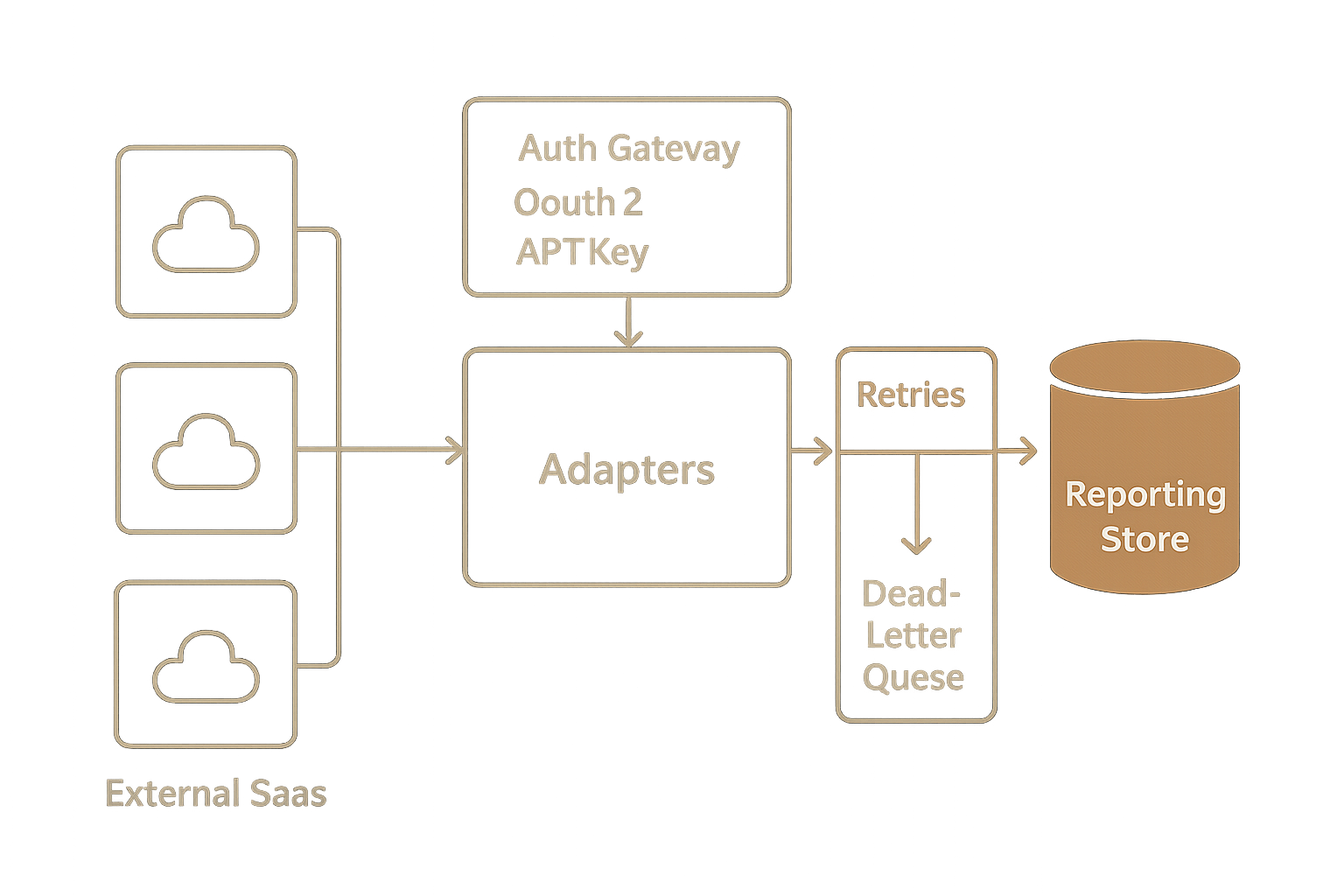
Security: encrypt sensitive fields in transit and at rest, use role-based access controls, and produce audit logs for changes. Auth: prefer OAuth2 for user-scoped integrations and API keys for system-to-system clients; store secrets in a vault. Rate limits: implement backoff strategies, queueing, and circuit breakers; track vendor limits per integration. Retries: make updates idempotent and add dead-letter queues for failed messages; provide reconciliation endpoints. Data mapping: canonicalize field names, define authoritative owners for each field, and maintain transformation rules in a managed mapping layer to avoid ad-hoc scripts.
These technical considerations are small when planned up front but expensive to retrofit.
FAQ
Is an API integration strategy worth the investment?
Yes if manual handoffs are consuming people-hours, creating errors, or blocking growth. The strategy helps prioritize integrations that reduce recurring cost and operational risk. We quantify expected savings during discovery to inform the investment decision.
How long before we see benefits?
Quick automations can show measurable time savings in weeks; a phased MVP typically shows broader benefits in 8–16 weeks. The first pilot should deliver a clear KPI improvement so you can fund the next phase.
Can we migrate incrementally while keeping spreadsheets live?
Yes. Incremental migration with incremental syncs or read-only archives is standard. Run parallel reports until you verify data integrity and have rollback plans for each cutover.
What are typical ongoing maintenance costs?
Expect annual maintenance to be roughly 10–20% of initial build cost for monitoring, small feature work, and vendor updates. Costs vary with SLAs and integration count.
Are no-code tools a long-term solution?
They work well for pilots and small workflows but can become costly and fragile at scale. Use them to validate workflows, then move high-volume or critical flows into code-backed integrations.
Who should own integrations inside the company?
We recommend a cross-functional owner model: product or operations owns the business intent, engineering owns reliability and platform, and security/compliance owns governance. Clear ownership reduces delayed fixes and confusion.
Conclusion
If several checklist items match your operations, you likely need an API integration strategy rather than more manual fixes. Start with a quick pilot to prove value, then move high-risk flows into a centralized layer with proper auth, monitoring, and mappings. We help companies move from manual handoffs to a maintainable integration platform—see our services, view project examples, or contact us for a short assessment and a prioritized integration roadmap.